Set up the game
Configure 2 to 4 full tables, with 4, 6 or 8 pairs. Review the movements and physical board relays before play.
BridgeClub Lite
Organize social duplicate bridge games with 2 to 4 tables. Movements, contracts, scores and results, all in one place.
In development
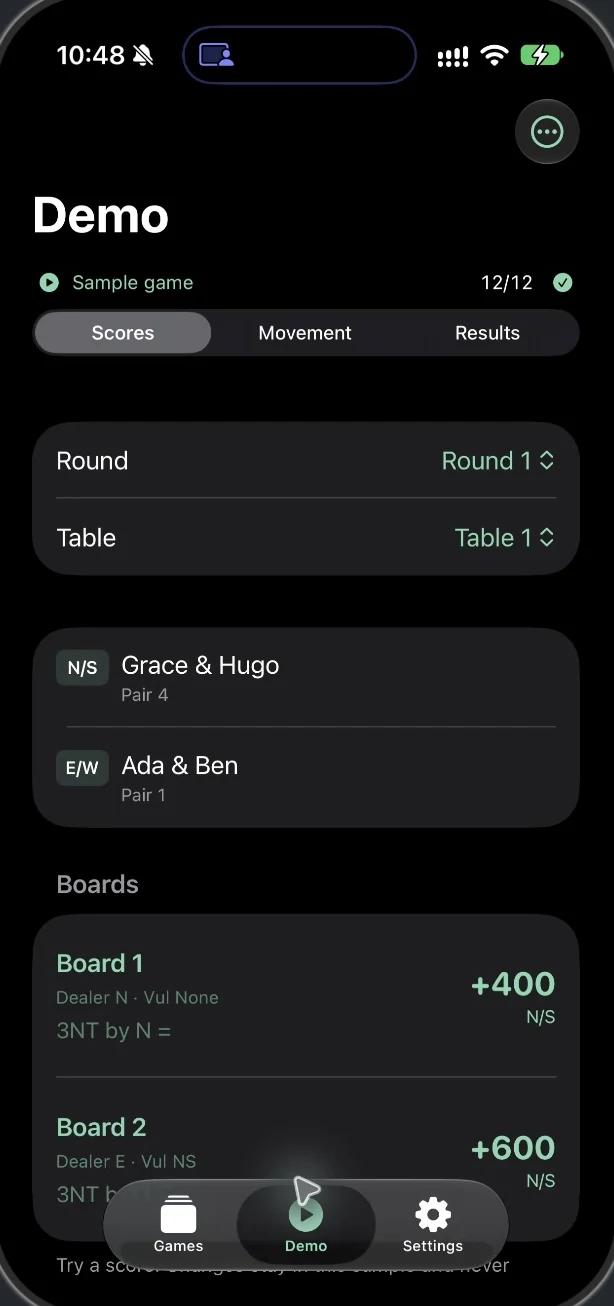
For the person bringing everyone together for an afternoon of bridge: plan the rotations, record each board and review the group’s results.
Configure 2 to 4 full tables, with 4, 6 or 8 pairs. Review the movements and physical board relays before play.
Record the contract, declarer and tricks taken. Corrections keep a history so you can review the previous result.
Check travellers and matchpoints. Final rankings appear only when all required results are complete.
Export a JSON backup to restore the game or a CSV for analysis. Printing uses the system options.
This is a tool for social games. It does not offer remote players, half tables or custom movements. Its rankings do not imply certification or approval by a federation or an independent director.
In development
The iPhone app is in development and commercial preparation. There is no verified public App Store download yet.
The iOS version is being prepared with a free demo and Full Club, a one-time unlock through Apple. Release and the live offer are still pending. Reading, importing and exporting your data remain independent of paid access.
Ask us by emailInformation reviewed October 18, 2026It is designed for social bridge with 2–4 full tables. It is not presented as a certified tournament system or a replacement for a director’s review.
The current workflow is designed for one organizer and one device. There is no remote play or synchronization between phones.
Export the game as JSON outside the app. You can import it again with its history. CSV is for reviewing data, not restoring the event.
The iOS release is still in preparation. There is no verified public App Store link. Contact support to ask about its status.
Help and information for BridgeClub Lite.